
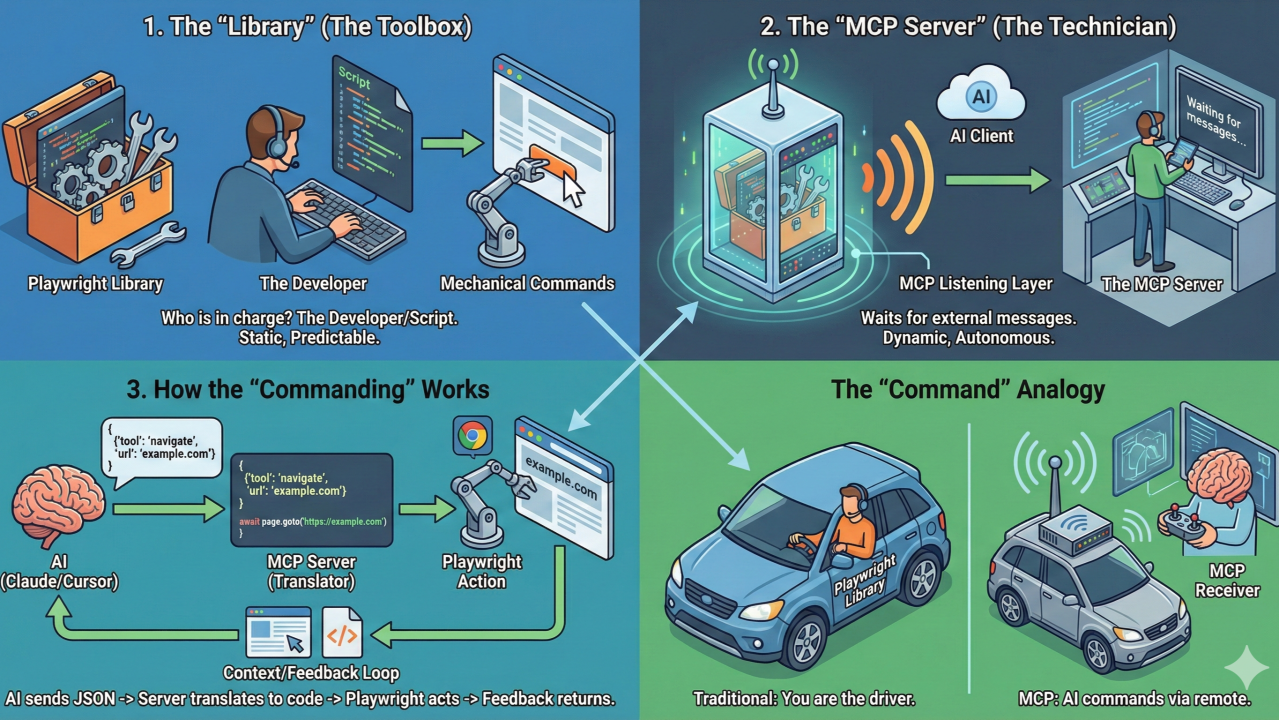
To understand how Playwright MCP turns a library into a “server,” it helps to think of the difference between a toolbox (the library) and a technician (the server).
1. The “Library” (The Toolbox)
Normally, Playwright is a library. This means it is a collection of code that sits on your hard drive. To make it do anything, you must write a script (in Python, JavaScript, etc.), run that script, and tell Playwright exactly which button to click and which URL to visit.
- Who is in charge? The developer/the script.
- How does it communicate? Hard-coded commands.
2. The “MCP Server” (The Technician)
When you run the Playwright MCP Server, you are wrapping that toolbox in a “listening” layer. Instead of waiting for a pre-written script, it sits active and waits for external messages from an AI.
It uses the Model Context Protocol (MCP), which is like a standardized language that AIs and tools use to talk to each other.
3. How the “Commanding” Works
When the AI (like Claude or Cursor) decides it needs to see a website, the process looks like this:
- The Request: The AI sends a JSON message to the MCP Server: “Hey, use your ‘navigate’ tool to go to example.com.”
- The Translation: The MCP Server receives this. It “knows” Playwright. It translates that English-like request into the actual Playwright code: await page.goto(‘https://example.com’).
- The Action: Playwright opens the browser and goes to the site.
- The Context: The MCP Server then takes the result (a screenshot, the HTML, or the accessibility tree) and sends it back to the AI.
- The Feedback Loop: The AI looks at the data and sends a new command: “I see a ‘Login’ button. Use your ‘click’ tool on that button.”
Why this is a “Server”
It is called a server because it provides services to a client (the AI)

The “Command” Analogy
Think of the Playwright Library as a car. Usually, you are the driver (writing code) turning the steering wheel.
Playwright MCP is like putting a remote-control receiver on that car. Now, the AI can sit in a different room and “command” the car where to go by sending signals to that receiver.

But, why the MCP server exposes some tools to the AI client?
The MCP server acts as a security and capability filter, exposing specific tools to the AI client for three primary reasons: Abstraction, Security, and Structured Interaction.
1. Abstraction (Simplification)
The MCP server simplifies complex coding tasks into high-level tools that the AI can understand.
- Hiding Complexity: A single Navigate tool in the MCP server hides dozens of lines of Playwright logic, such as waiting for network idle, handling timeouts, and managing cookies.
- Standardized Language: By exposing tools, the server provides a manifest or a list of definitions that use a standardized language (JSON) that the AI can easily parse and use to make decisions.
2. Security and Control (Sandboxing)
Exposing only specific tools creates a permission-based interface that protects the host system.
- Defined Scope: The AI can only perform actions that are explicitly exposed as tools; if a Delete Database tool isnt exposed, the AI has no way to execute that command, even if it tries to describe it in text.
- Validation: The MCP server acts as a gatekeeper, validating the parameters the AI sends (like a URL or a button selector) before passing them to the actual Playwright framework to prevent malicious or accidental system damage.
3. Providing “Eyes and Hands”
Since an AI model is essentially a text-based brain, it has no native way to interact with the physical or digital world.
- Interaction (The Hands): Tools like Click and Navigate provide the AI with the “hands” needed to physically manipulate a web browser.
- Context (The Eyes): Tools like Snapshot provide the AI with its “eyes,” returning the current state of a webpage (HTML or Accessibility Tree) so the AI can analyze what to do next in a continuous feedback loop.
